Online shoppers are becoming less willing to imagine what a configurable product might look like. They increasingly want to see the final result before making a purchase.
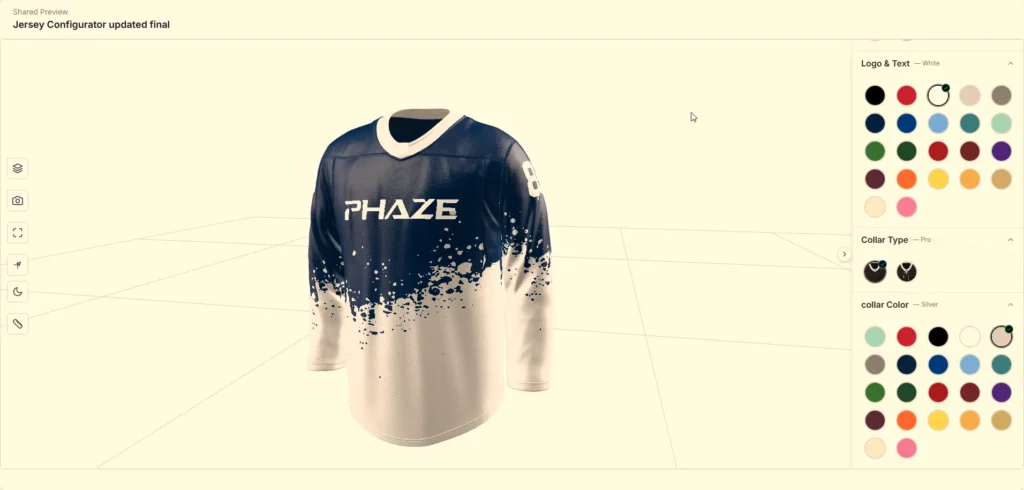
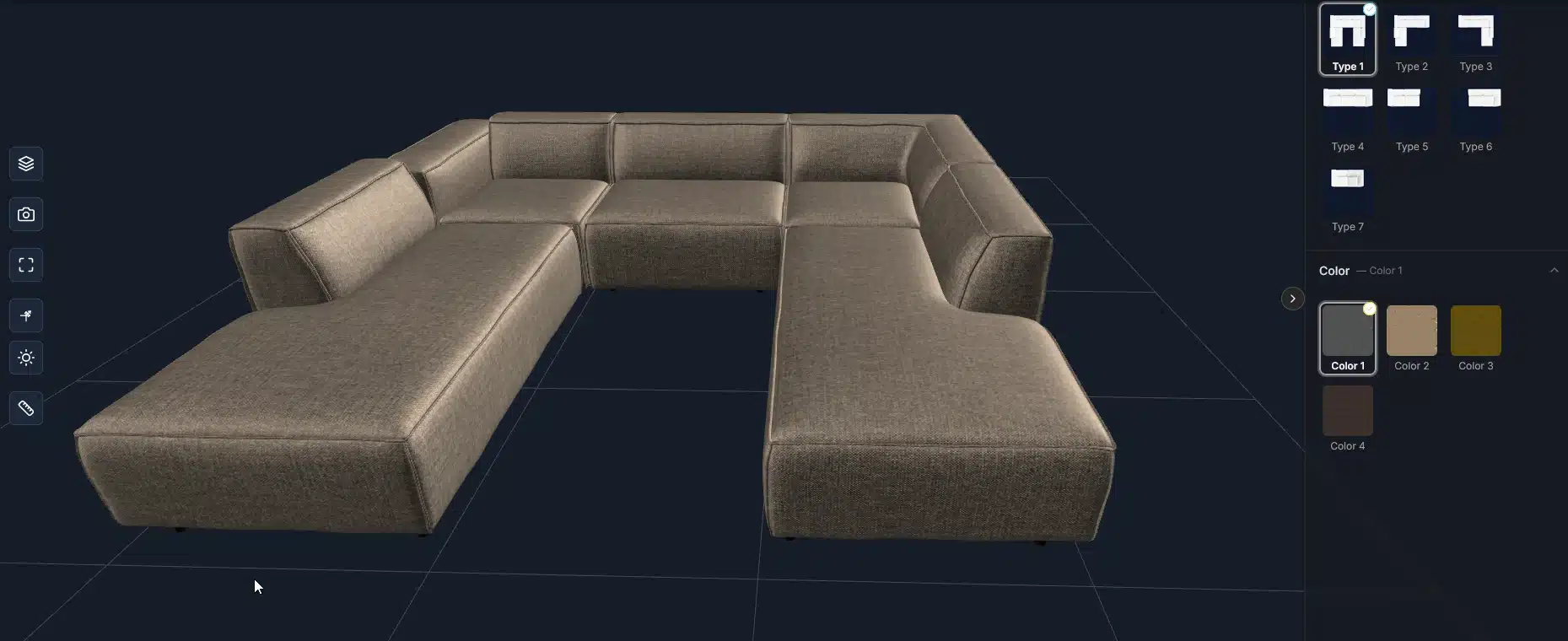
A customer buying a sofa may want to change the fabric, legs, dimensions, or module arrangement. Someone ordering a custom sports jersey may need to select primary and secondary colors, add a logo, choose a player name and number, and preview the final design before purchasing.
Static product images struggle when one product can have dozens, hundreds, or even thousands of possible combinations. This is where an e-commerce product configurator becomes valuable.
A well-designed 3D configurator does much more than display a rotatable model. It connects product visualization with selectable options, configuration rules, pricing or quotation data, e-commerce workflows, and sometimes augmented reality.
At 4dviz Studio, our experience with configurator-ready production includes:
- Furniture and product visualization
- In-house web configurator workflows
- A customizable hockey jersey for Shopify
- More than 1,000 optimized eyewear assets for virtual try-on applications
- Approximately 2,000 residential assets prepared for a large real-time visualization and configuration pipeline
These projects taught us an important lesson: the visible 3D model is only one part of a successful configurator.
What Is an E-Commerce 3D Product Configurator?
An e-commerce product configurator is an interactive application that allows customers to customize a product and visualize those selections before purchasing or requesting a quote.
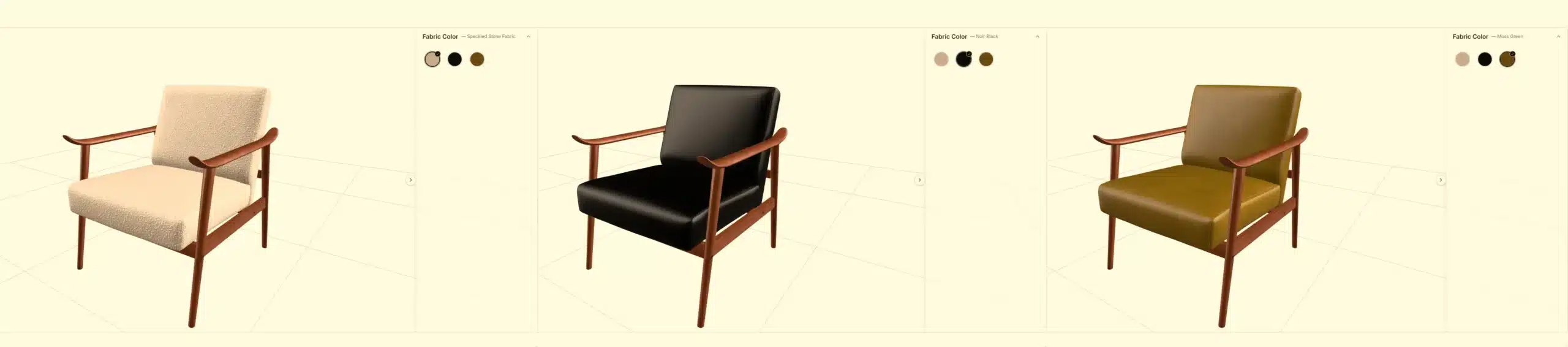
Instead of showing separate photographs for every possible variation, one configurable 3D asset can represent multiple combinations.
A furniture customer might choose upholstery, frame finish, leg style, dimensions, or optional modules. A sportswear customer might customize jersey colors, logos, numbers, and player names. A manufacturer may allow buyers to change dimensions, accessories, finishes, or component combinations.
When the customer makes a selection, the visual product changes immediately.
The configurator may also update other information such as price, SKU, specification, quotation data, available accessories, or the final order configuration.
That makes a modern product configurator for e-commerce more than a visualization feature. It can become part of the sales infrastructure.
3D Viewer vs 3D Customizer vs 3D Configurator
These terms are often used interchangeably, but they represent different levels of functionality.
| Experience | What the customer can do | Typical use |
| 3D Viewer | Rotate, zoom and inspect a model | Product presentation |
| 3D Product Customizer | Change colors, materials, graphics or text | Product personalization |
| 3D Product Configurator | Change materials, components, sizes and valid product combinations | Complex configurable products |
| Visual CPQ | Configure + calculate price + generate quotation/order data | B2B and manufacturing |
A basic product viewer may be enough when the objective is simply to replace or enhance photography.
But when product selections affect price, compatibility, manufacturing, SKU information or checkout, you are no longer dealing with only a viewer. You are building a configuration system.
Why E-Commerce Brands Use 3D Product Configurators
Traditional product pages work well when the customer is choosing between a small number of fixed SKUs. They become less efficient when the product has many visual or structural variations.
Imagine a sofa available in several modules, dozens of fabrics, multiple leg finishes, and several dimensions. Photographing every possible version quickly becomes unrealistic.
A 3D product configurator ecommerce workflow approaches the problem differently. Instead of creating one image for every variation, the product is structured into reusable 3D geometry, materials, components, and configuration rules.
This can give brands several advantages:
- Customers can understand their selected product more clearly
- Product variations can be demonstrated without separate photography for every combination
- Sales teams can communicate complex options more efficiently
- New materials or finishes can sometimes be added without rebuilding the full product
- Customers receive immediate visual feedback while configuring
- Product options can be connected to pricing, quoting, or checkout workflows
For configurable products, the biggest benefit is often not the novelty of 3D. It is reducing uncertainty between what a customer selects and what they believe they are buying.
How a 3D Product Configurator Actually Works
A configurator is usually built from several connected layers.
The first layer is the 3D asset. This includes geometry, UVs, textures, materials, hierarchy and naming.
The second layer is the configuration logic. This determines which materials, components, sizes or options can be selected and which combinations are valid.
The third layer is the interactive viewer. This renders the product in real time and responds to customer selections.
The fourth layer is the commerce layer. It handles data such as variant IDs, prices, quotations, cart information, saved configurations or customer requests.
The fifth layer is the integration layer, where the configurator communicates with Shopify, WooCommerce, another commerce platform, CRM, ERP, PIM or a custom backend.
This distinction matters because an excellent high-poly 3D model is not automatically an excellent configurator asset.
Production assets must be designed for real-time interaction.
The Process of Implementing an E-Commerce Configurator Solution
1. Define the Product Before Building the Configurator
The first question should not be:
“What configurator software should we use?”
The better question is:
“What exactly can the customer change?”
A configurable product should be broken into properties.
For a sofa, those properties might include:
- Upholstery
- Frame type
- Legs
- Modules
- Dimensions
- Accessories
For a jersey, they may include:
- Body color
- Secondary color
- Logos
- Player name
- Player number
- Number and name color
For a manufactured product, they could include dimensions, hardware, finishes, accessories, and optional assemblies.
Once these variables are defined, they can be translated into a configuration matrix. That matrix becomes the bridge between product knowledge, 3D production, and development.
2. Map Valid and Invalid Combinations
Products frequently contain dependencies.
A particular component may only fit one size. A material may not be available for a specific version. One module may require another module. Some options may change price or manufacturing requirements.
If these relationships are discovered after the 3D production is almost finished, expensive rework is likely.
For that reason, we prefer defining configuration logic before final asset production wherever possible.
The key question is not simply how many options exist.
The important question is how those options interact.
3. Create Configurator-Ready 3D Models
The next stage is creating the digital product.
Depending on the project, the source information may include CAD, STEP files, technical drawings, dimensions, photography, reference images or existing high-resolution 3D assets.
For configurator work, accuracy and optimization have to be balanced.
A product may look excellent in an offline renderer while still being unsuitable for an online 3D product configurator.
The model needs clean topology, correct scale, appropriate UVs, logical object separation and a predictable hierarchy.
Parts that change independently should usually remain independently addressable.
If a chair’s frame and upholstery use different configuration rules, for example, combining everything into one uncontrolled object can make future customization harder.
4. Build a Reusable Material System
Materials deserve special attention.
Instead of treating every configured variation as an entirely new 3D model, many systems reuse one optimized geometry asset with different PBR materials.
For furniture, this may mean reusable:
- Fabric libraries
- Leather materials
- Wood finishes
- Metal finishes
- Plastic finishes
For apparel, it may involve separate material zones for:
- Body panels
- Logos
- Numbers
- Names
- Trim
For manufactured products, it may include paint finishes, metals, plastics, and surface treatments.
A good material architecture can dramatically simplify a large product configurator.
5. Optimize the Asset for Real-Time Delivery
Web-based 3D is not offline rendering.
Large textures, excessive polygons, duplicated geometry and unnecessarily complicated materials can quickly damage loading time and mobile performance.
For many web workflows, GLB/glTF is particularly useful because it was designed for efficient runtime delivery. The Khronos glTF ecosystem also supports modern PBR materials, material variants and GPU-friendly texture workflows such as KTX 2.0.
Optimization therefore happens at several levels: geometry, textures, materials, scene hierarchy and downloadable asset size.
The objective is not simply “make the polygon count low.”
The objective is preserve the product details customers notice while removing cost they do not notice.
That requires judgment.
How We Approach 3D Asset Optimization for Configurators
Optimization is one of the areas where a 3D product configurator tool can succeed or fail before the actual software configuration even begins.
We normally think about the asset in terms of visual importance.
A silhouette, seam, hardware component or upholstered edge may require actual geometry. Extremely small surface information may be more efficient as a normal map or texture.
Repeated objects can often reuse geometry.
Texture dimensions should also match their real importance. Giving every product component several 4K maps may create excellent screenshots while producing an unnecessarily heavy web experience.
Texture compression can become equally important. Khronos specifically developed KTX 2.0 and Basis Universal workflows to reduce texture transmission size and GPU memory requirements in glTF applications.
The final asset should then be tested inside the actual runtime environment, not only inside the DCC application used to create it.
That last point is important.
A model that behaves perfectly inside 3ds Max or another authoring application may expose different problems after export.
Choosing the Right E-Commerce 3D Configurator Software
There is no universally best 3D configurator software.
The correct choice depends on the product architecture and business workflow. A simple product that only changes colors requires a very different system from a modular furniture product with compatibility rules, dynamic pricing, and quotation generation.
The decision should therefore be based on capabilities rather than brand recognition.
| Requirement | What to evaluate |
| Visual customization | Material, color and texture switching |
| Structural configuration | Component swapping, modules and dimensions |
| Product rules | Dependencies, exclusions and valid combinations |
| Commerce | Cart, pricing, quotation and checkout |
| Asset management | Models, materials and variation libraries |
| Integration | API, Shopify, WooCommerce, ERP, CRM or PIM |
| Mobile experience | Loading and interaction on real phones |
| AR | GLB/USDZ/WebAR requirements |
| Scalability | Ability to manage additional products and materials |
| Administration | How easily internal staff can update options |
For relatively straightforward visual configuration, an existing SaaS platform or e-commerce plugin can reduce development work.
For products with specialized business rules or unusual UX requirements, a custom web configurator may provide more control.
The correct architecture should be decided before large-scale content production begins.
E-Commerce Platform Compatibility: Shopify, WooCommerce and Custom Websites
A common misconception is that a configurator is simply uploaded to an e-commerce platform like a normal product image.
Sometimes that is possible for basic 3D viewing. Complex configuration normally requires additional logic.
Shopify 3D Product Configuration
Shopify currently supports 3D models as product media and can work with GLB and USDZ assets. Its developer documentation also supports AR-related product experiences.
However, product-media support alone is not the same as building a full configurator.
Advanced customization may require an application, an embedded configurator, custom theme development, APIs or a third-party configuration platform.
Our hockey jersey project is a useful example.
The product was prepared for an Angle 3D configurator running with Shopify rather than building an entirely new Shopify rendering engine from scratch.
WordPress and WooCommerce 3D Configurators
A WordPress 3D product configurator or 3D product configurator for WooCommerce can similarly be implemented through a dedicated plugin, embedded application or custom integration.
The important requirement is ensuring that the customer’s configuration survives the transition from visualization to commerce.
Changing a product visually is not enough.
When the customer clicks Add to Cart, Request Quote or Submit, the system needs to know what was selected.
That information might include selected materials, components, text, dimensions, variant identifiers and sometimes a preview image or configuration ID.
Custom Website Integration
For custom websites, the configurator may communicate with the rest of the application through APIs or form actions.
In one configuration workflow we worked around, a major integration question was how the configurator should send structured configuration data to the quotation system.
Thinking about the project as a Configurator-to-Quote Data Flow helped separate three responsibilities: what the user selects, how those selections are structured, and where that structured information is sent.
This is a much more scalable approach than treating the configurator as an isolated visual widget.
Real 3D Configurator Case Study: Custom Hockey Jersey for Shopify
Apparel creates a different kind of configuration problem.
Instead of changing furniture components or rigid geometry, customers frequently customize colors, graphics and personalized text.
For a hockey jersey project, our 3D model was prepared for integration into the Angle 3D Shopify configurator.
The configurable requirements included primary and secondary jersey colors, logo colors, player name, player number, and color customization for the name and number.
Want the full breakdown?
See how we built and tested this jersey for Angle 3D.
View the Hockey Jersey Case Study
Why the Asset Structure Mattered
Each configurable visual region had to be prepared so the configurator could control it independently.
This is exactly why configurator models should not be approached like ordinary presentation models.
The developer or configurator platform needs predictable material zones and object structure.
A visually correct asset with poorly separated materials can create unnecessary integration work.
Realism Still Matters
Optimization does not mean the product can look artificial.
During the jersey refinement process, we updated details such as the collar and reduced excessive sleeve wrinkles to achieve a more believable hockey jersey appearance.
This may sound like a small modeling issue, but these details are visible immediately when customers rotate a product at close range.
The final test version was prepared inside the Angle 3D workflow for client approval before the product went live.
This project reinforced an important point:
The best 3D product customizer balances configurator logic with product realism.
Neither can be treated as an afterthought.
Configurator Asset Architecture: The Part Many Projects Underestimate
One of the largest differences between a small demo and a scalable 3D web configurator is asset architecture.
Suppose a brand launches ten configurable products.
A loose manual setup may work.
Now imagine hundreds of products, hundreds of materials and several customization zones per product.
Without standards, the system becomes increasingly difficult to maintain.
A scalable asset system should define consistent object names, material names, texture conventions, coordinate orientation, scale, pivot behavior and export settings.
The same principle applies to configuration IDs and product option mapping.
This may sound less exciting than photorealistic rendering, but it has enormous operational value.
A beautiful configurator that cannot be maintained efficiently becomes expensive very quickly.
The Variant Explosion Problem
Configurator projects often look simple at first because the visible interface may contain only a few dropdowns. The complexity exists underneath.
Consider a product with:
- Several interchangeable components
- Multiple sizes
- Several materials
- Multiple colors
- Optional accessories
The theoretical number of combinations can grow extremely quickly.
The correct solution is generally not to create a separate 3D model for every possible combination. Instead, assets should be modular where appropriate, and configuration logic should determine which parts and materials are loaded or displayed.
This is one reason why the relationship between the 3D production team and configurator developer matters so much.
The developer needs to understand the product structure, while the 3D team needs to understand how that structure will be controlled.
Performance Optimization for a Web 3D Product Configurator
Performance should be considered during production rather than applied as a cleanup step immediately before launch.
An effective web 3D product configurator needs to consider initial download size, texture memory, geometry complexity, material complexity and the number of simultaneously loaded assets.
Modern browser tools such as Google’s <model-viewer> demonstrate how GLB assets can be displayed interactively across modern desktop and mobile browsers and can also participate in AR workflows.
But the presence of an efficient viewer cannot fix an unnecessarily heavy asset.
Optimization therefore remains a production responsibility.
Mobile Performance Is the Real Test
Desktop workstations can hide performance problems.
Phones expose them.
We recommend testing representative products on real mobile hardware during production rather than waiting until the complete catalog has already been converted.
If the first ten products reveal an asset problem, modifying the pipeline is manageable.
Discovering that same problem after converting hundreds of products is significantly more expensive.
Real-Time Materials: Why Offline Shaders Cannot Simply Be Exported
Another common problem appears when assets originate from traditional product rendering workflows.
V-Ray, Corona and other offline rendering systems can create highly sophisticated materials.
A web renderer does not automatically reproduce those shaders.
Configurator-ready materials typically need to be rebuilt or translated into a real-time PBR workflow.
Base color, roughness, metallic properties, normal information, opacity and other supported characteristics need to be checked in the target viewer.
The final validation should therefore happen where the customer will actually see the product.
Not only inside the authoring software.
This becomes especially important for difficult materials such as fabric, coated metal, translucent plastic, leather, glass and highly reflective surfaces.
Configurator Integration: Connecting 3D to the Shopping Journey
A good configurator does not end when the product looks correct.
The configured product needs somewhere to go.
Depending on the commercial workflow, that destination may be Add to Cart, Checkout, Request a Quote, Save Configuration, Share Design, Contact Sales or an internal production system.
This is where a product configurator e-commerce project becomes a software/data project as well as a 3D project.
A useful implementation should preserve the configuration.
For example, if a customer selects black upholstery, oak legs and a specific module combination, that information should not disappear after they leave the viewer.
The commerce system needs a structured representation of the product the customer created.
For simple stores this may be variant information attached to the cart.
More sophisticated systems may store a configuration JSON, configuration ID, preview image, product specification or quotation data.
What Makes Furniture Configurators Different?
Furniture is particularly suitable for configurators because customers care about both appearance and composition.
A typical furniture configurator may control upholstery, wood or metal finishes, dimensions, legs, cushions, accessories and modular sections.
A sectional sofa introduces additional complexity because components also have positional relationships.
This can require rule-based configuration rather than simple material swapping.
Current furniture-focused configurator platforms increasingly combine interactive configuration with modular logic, commerce and AR because these products often contain many valid combinations.
For brands considering furniture configuration, the most important preparation step is building a clean product-options matrix before the asset-production stage.
What Makes Apparel and Jersey Configurators Different?
A jersey configurator often has fewer structural components but considerably more graphic personalization.
Customers may need to select colors, patterns, logos, numbers, names and sometimes typography.
The 3D production strategy therefore focuses heavily on clean UVs and separately controllable material zones.
Text and number placement also needs to follow the deformation and orientation of the garment correctly.
A flat design that looks correct in Photoshop may not automatically look correct when wrapped around a sleeve, shoulder or curved back surface.
This is why apparel configuration benefits from testing inside the actual interactive product rather than approving only flat texture files.
3D Product Configurator Software vs Custom Development
Businesses commonly face another decision: use an existing platform or develop a custom solution.
Existing platforms can be effective when their configuration model aligns with the product.
They may already provide dashboards, rule systems, e-commerce integrations and support infrastructure.
A custom solution provides more control but transfers more responsibility to the development team.
Custom development may make sense when the interaction is highly specialized, the configuration logic does not fit existing tools, the brand requires a unique user experience, or the configurator needs deep integration with another internal system.
The mistake is deciding based only on software subscription price.
The total project includes the configurator platform, integration, 3D asset production, product-data preparation, testing, maintenance and future catalog expansion.
Key E-Commerce Configurator Software Solutions and Their Benefits
There are many options in today’s configurator market.
Expivi focuses heavily on real-time product configuration, pricing and e-commerce integration. Threekit combines visual configuration with broader product and manufacturing workflows. Other products target furniture specifically, while lighter tools focus primarily on simple material switching and personalization.
For some projects, an established platform is the correct answer.
For others, a custom Three.js, WebGL or similar web implementation may provide better control.
A business evaluating platforms should therefore run a real product test rather than deciding from marketing demos alone.
Give the shortlisted provider one representative product with enough complexity to expose the real requirements.
If the test product works well, scaling becomes a more informed decision.
Common Problems We Have Seen in 3D Configurator Production
The most expensive issues are frequently caused before the configurator itself is built.
One common problem is receiving incomplete source data. Accurate product models sometimes need to be reconstructed from partial CAD, drawings, dimensions and reference photography.
Another is creating beautiful 3D assets before deciding which parts need to be configurable.
A third is uncontrolled material naming. If every artist structures materials differently, integration becomes slower as the catalog grows.
Another major issue is testing only on powerful computers.
And perhaps the most overlooked problem is treating 3D production and development as separate projects.
They are separate disciplines, but they need a shared technical specification.
Our Recommended Production Workflow
For a new ecommerce product configurator, we start by separating three questions.
First: what can the customer configure?
Second: what does the 3D engine need in order to represent those changes?
Third: what information must the e-commerce or business system receive after the customer finishes?
Once those questions are answered, asset production becomes much more predictable.
The typical project then moves through product-data review, configuration mapping, representative prototype asset, material testing, optimization, configurator setup, integration testing, catalog production, quality control and final deployment.
For large catalogs, the prototype should be completed before mass production.
That prototype effectively becomes the production specification for every asset that follows.
Tips for a Successful E-Commerce 3D Configurator Project
The strongest configurator projects are usually not the projects with the most features. They are the projects with the clearest product logic.
A few practical recommendations:
- Start with one representative product
- Use the prototype to prove visual quality and performance
- Define configurable zones before final modeling
- Agree on naming and export standards
- Test mobile performance early
- Keep the customer interface simple
- Keep complex logic behind the interface
- Maintain communication between product, development, and 3D teams
The configurator sits between all three.
How to Measure Whether Your Configurator Is Working
A successful configurator should have measurable business objectives.
The exact KPIs vary according to the project.
For D2C e-commerce, brands may examine configurator engagement, completion rate, Add-to-Cart rate, conversion rate, average order value and return behavior.
For B2B products, the relevant metrics may be completed configurations, qualified leads, quotation requests, sales-cycle duration or reduction in manual quoting work.
For a product team, operational metrics such as time needed to launch a new material or variant may be equally important.
This is another reason we avoid treating the configurator as a visual gimmick.
It should solve a measurable problem.
How Much Does an E-Commerce 3D Product Configurator Cost?
There is no useful universal price for a complete configurator.
A product that only switches five colors is fundamentally different from a modular system with hundreds of components, rule logic, dynamic pricing, AR and ERP integration.
Cost is normally influenced by the number of products, model complexity, number of configurable components, material count, quality of available source data, configuration rules, interface requirements, e-commerce integration, AR requirements and the amount of custom development.
The best way to estimate a project is therefore to create a configuration matrix and representative product first.
That produces a much more reliable scope than estimating from the total number of SKUs alone.
Why Choose 4dviz for 3D Product Configurator Services?
4dviz approaches configurator projects from both the 3D production and interactive-product perspective.
Our background includes large-scale furniture and product modeling, web-optimized GLB/glTF assets, AR and virtual try-on production, configurator-ready product assets and high-volume real-time architectural production.
Our own configurator work has also helped us understand problems beyond 3D modeling: material switching, object structure, product variants, browser optimization, client-side configuration and integration workflows.
[MEDIA PLACEHOLDER — 4DVIZ CONFIGURATOR SHOWREEL]
This is important because producing an attractive model is only the first step.
The model must also survive the full pipeline from authoring software to exported asset, browser renderer, configuration logic and customer-facing experience.
For projects where another software company or configurator platform handles the application layer, we can work specifically as the 3D production and optimization partner.
Where the project requires broader configurator setup and technical implementation, that scope can be defined separately.
This keeps responsibilities clear and avoids promising a software architecture that does not match the actual project requirements.
Building a Scalable 3D Product Configuration Pipeline
The most valuable configurator is not always the most visually complex one.
For a business with a growing catalog, maintainability matters.
A reusable geometry strategy, organized material library, predictable naming structure and tested export workflow can reduce the amount of production required for each new product.
Our experience working with hundreds and thousands of optimized assets has reinforced this repeatedly.
Scale is not achieved simply by adding more artists.
It comes from reducing unnecessary decisions inside the production process.
When the same technical decisions are made consistently across every asset, quality control and integration become significantly easier.
Can a Configurator Also Support Augmented Reality?
Yes, depending on the configurator architecture and asset pipeline.
A configured product can potentially be viewed in AR after customization, although the implementation requirements vary between platforms.
Shopify supports 3D product media and AR-oriented GLB/USDZ workflows, while <model-viewer> supports several browser/device AR modes including WebXR, Scene Viewer and Quick Look.
The main challenge for configurable AR is ensuring that the AR asset represents the configuration the customer actually created.
That may require generating or assembling the appropriate configured asset rather than simply launching one fixed model.
For furniture in particular, this can be valuable because the user can first configure a product and then evaluate it at real scale in their space.
3D Configurator SEO and Product-Page Performance
There is another issue brands should not ignore: the configurator exists inside a webpage.
The rest of that page still needs to:
- Load quickly
- Explain the product
- Remain accessible
- Support search visibility
- Provide product specifications
- Show supporting media
- Include useful written content
A heavy 3D experience should therefore not block every useful part of the page unnecessarily.
Poster images, progressive loading, and intentional asset-loading strategies can help provide useful content while the interactive 3D asset becomes ready.
The product page should also retain normal searchable content such as:
- Product descriptions
- Configuration information
- Specifications
- FAQs
- Supporting images
- Video
- Technical information
The objective should be combining interactive commerce with a strong conventional product page rather than replacing the entire page with a canvas.
Conclusion: The Best 3D Configurator Starts Before the Software
An e-commerce product configurator can transform how customizable products are presented and sold online.
But the success of the project depends on more than choosing a piece of software.
A scalable configurator requires accurate product data, properly structured 3D assets, reusable materials, clear option logic, efficient web optimization and a reliable connection between customer selections and the commercial workflow.
Our experience across furniture, customized apparel, virtual try-on assets and large-scale real-time production has shown that the strongest projects treat the 3D asset as part of a system rather than as an isolated model.
If your business is evaluating a 3D product configurator for ecommerce, begin by documenting your configurable products and identifying one representative test item.
From there, the correct modeling, optimization, software and integration strategy becomes much easier to define.
Frequently Asked Questions
What is an e-commerce product configurator?
An e-commerce product configurator is an interactive tool that lets customers select options such as colors, materials, dimensions or components and visualize the resulting product before purchasing or requesting a quote. Advanced configurators can also connect those selections with price, cart data, CPQ or production information.
What is the difference between a 3D viewer and a 3D product configurator?
A 3D viewer mainly allows customers to rotate, zoom and inspect a fixed product. A configurator changes the product based on customer selections. Those changes may include materials, components, dimensions, graphics or compatible product options.
What products are best suited for 3D configuration?
Products with meaningful customization generally benefit most. Common examples include furniture, apparel, sportswear, footwear, eyewear, cabinetry, doors, lighting, vehicles, industrial products, modular products and customized consumer goods.
Can I use a 3D product configurator with WooCommerce?
Yes. A 3D product configurator WooCommerce implementation can use an existing WordPress plugin, an embedded configurator platform or a custom application connected to WooCommerce. The integration method should depend on how configuration data, prices, variations and orders need to be stored.
What 3D format is best for an online product configurator?
GLB/glTF is widely used for real-time web delivery because it supports efficient geometry, PBR materials, textures and a broad real-time ecosystem. The final format should still be selected according to the configurator platform and integration requirements.
Can a furniture configurator support different fabrics and finishes?
Yes. Reusable material libraries are one of the most effective approaches for furniture configuration. Correct UVs and standardized material zones allow the same optimized geometry to display multiple fabric, leather, wood and metal options.
Can a configured product be added directly to the shopping cart?
Yes, provided the configurator is connected correctly to the commerce system. The selections need to be translated into a valid SKU, product variant, line-item data, saved configuration or another structured representation understood by the checkout system.
How long does it take to build a 3D product configurator?
The timeline depends heavily on the number of products, quality of source data, configuration complexity, software platform, integration requirements and asset-production volume. A representative prototype is usually the best way to validate the workflow before estimating a large catalog.