E-commerce brands are losing sales because customers can’t see how a product actually looks in their space. Augmented reality solves this — but only if you have the right 3D models behind it. AR 3D models for e-commerce allow shoppers to place, rotate, and examine products in their own environment before purchasing, dramatically reducing uncertainty and return rates. For furniture, home décor, and consumer product brands, the quality of your AR asset directly determines whether the experience builds confidence or frustrates the customer. This guide breaks down what makes AR product visualization work — and what your 3D models need to deliver it properly.
What Is AR Product Visualization, and Why Do E-Commerce Brands Need It?
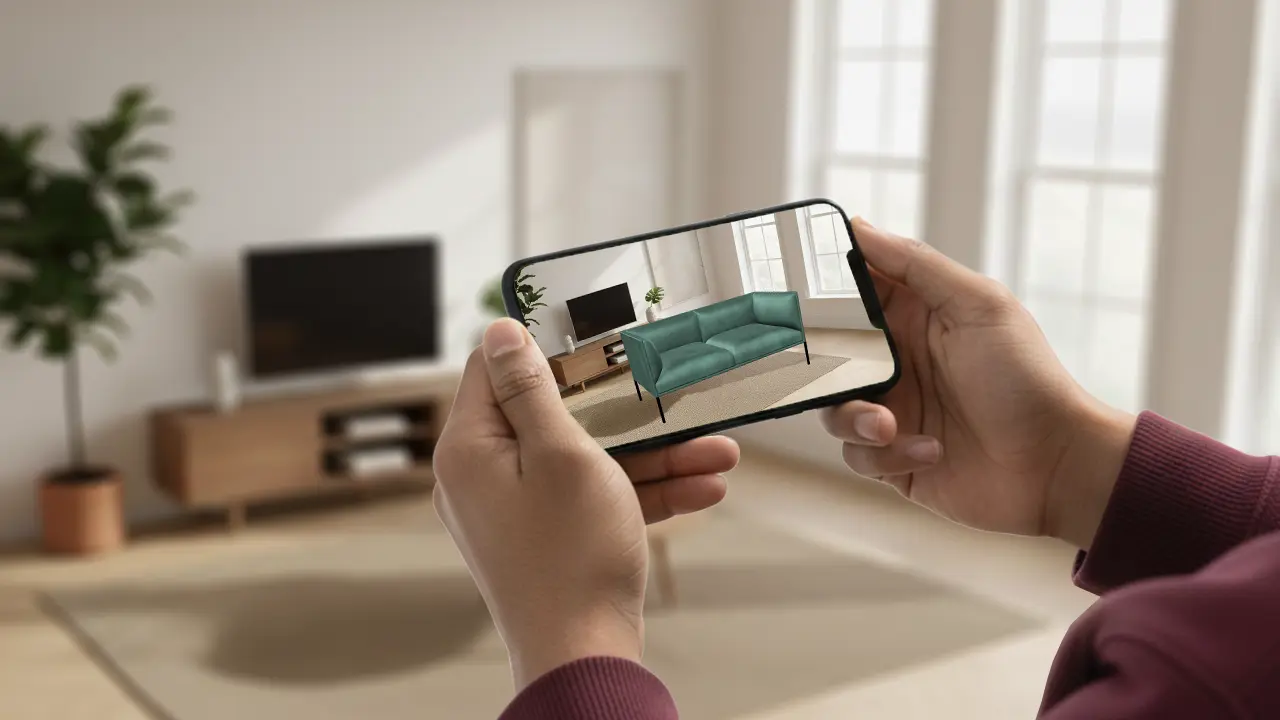
AR product visualization is the use of augmented reality to display a true-to-scale, photorealistic 3D model of a product in the shopper’s real environment through a phone, tablet, or AR headset.
E-commerce brands are losing sales because customers cannot see how a product actually looks in their space. Augmented reality solves this — but only if you have the right 3D models behind it. AR 3D models for e-commerce allow shoppers to place, rotate, and examine products in their own environment before purchasing, dramatically reducing uncertainty and return rates. For furniture, home décor, and consumer product brands, the quality of your AR asset directly determines whether the experience builds confidence or frustrates the customer. This guide breaks down what makes AR product visualization work — and what your 3D models need to deliver it properly.
What Makes AR Actually Work in E-Commerce
Augmented reality in e-commerce is not a single technology — it is a pipeline. A customer opens a product page, taps “View in your space,” and within seconds a sofa, a lamp, or a pair of sneakers appears in their living room at accurate scale. What they never see is the work underneath: a precisely built 3D model optimised for real-time rendering on a mobile device.
The AR experience is only as good as the 3D asset powering it. A poorly built model shows up with wrong proportions, flat textures, or visual glitches that immediately break trust. A well-built AR 3D model for e-commerce looks like the real product — same material finish, correct dimensions, accurate colour under ambient light.
This is the part most brands underestimate when planning an AR rollout. The technology platform (Apple ARKit, Google ARCore, or WebAR) is readily available. The bottleneck is always the 3D asset quality.
What AR-Ready 3D Models Must Include
Not every 3D model works for augmented reality. A model built for a product catalogue render is very different from one built for real-time AR on a smartphone. Here is what AR-ready 3D models for e-commerce must deliver:
Optimised polygon count
AR runs in real time on mobile hardware. A model with millions of polygons will cause lag, heat the device, and drain battery — killing the experience. AR-ready models use low-to-mid poly geometry (typically 10,000–50,000 polygons depending on product complexity) while preserving visual fidelity through smart topology.
PBR materials and textures
Physically Based Rendering (PBR) materials respond to ambient lighting in a physically accurate way. This is critical for AR, where the product must blend with the real environment around it. Textures need to be baked correctly — diffuse, roughness, metallic, and normal maps — so the product looks consistent whether placed in a bright kitchen or a dim bedroom.
Correct real-world scale
AR positions objects in physical space using device sensors. If your 3D model is built at the wrong scale, the product appears the wrong size in the customer’s room. Every AR 3D model for e-commerce must be modelled at 1:1 real-world dimensions, verified against the actual product specification.
Compatible file formats
Different AR platforms require different formats. Apple’s Reality Composer and Quick Look use USDZ. Web-based AR uses the glTF/GLB open standard, maintained by the Khronos Group as the industry-standard format for real-time 3D content delivery. Google’s ARCore works with glTF. A proper AR 3D modeling workflow produces the correct format for your distribution channel from the start — not a conversion that degrades quality.
Anchor-friendly geometry
For furniture and large products, the model needs a flat, stable base for surface detection. Irregular or floating base geometry causes AR placement to wobble or drift, creating a poor experience.
Industries Getting the Most from AR Product Visualization
AR product visualization for e-commerce are not limited to one sector. These are the industries where AR product visualization is delivering measurable results:
Furniture and home décor
This is the clearest use case. Customers buying a sofa, dining table, or bookshelf online have one primary question: will it fit and look right in my space? AR answers this directly. Brands like IKEA and Wayfair invested early in AR visualization, and the results showed significant reduction in return rates for furniture categories. For furniture brands producing a range of SKUs, having AR-ready 3D models for every product is becoming a baseline expectation among online retailers.
Consumer electronics
Electronics brands use AR to demonstrate scale and placement — showing how a speaker fits on a shelf, or how a monitor looks on a desk. Interactive AR models can also highlight product features through hotspot annotations, making the experience both visual and informative.
Lifestyle and home accessories
Lighting, rugs, wall art, and decorative objects are notoriously difficult to buy online because they depend entirely on context. An AR 3D model for e-commerce lets customers see a pendant lamp hanging from their ceiling at the right height, or a rug filling their floor space correctly.
Sporting goods and outdoor equipment
Tents, furniture, exercise equipment — products where size and spatial fit matter. AR helps customers understand exactly how much space a product occupies before committing to a purchase.
How AR 3D Models Reduce Returns and Boost Conversions
Product returns are one of the most expensive operational problems in e-commerce. Return rates for online furniture purchases can reach 20–30%, driven largely by size and appearance mismatch. Shopify’s research has shown that products with 3D and AR content have significantly lower return rates compared to those with only static images — a pattern we’ve seen play out specifically in furniture e-commerce, where AR is changing how people buy online.
The mechanism is straightforward. When a customer can place a 3D model of a product in their actual room and see it at accurate scale, they make a more informed decision. They either confirm it works for their space and buy with confidence, or they realise it does not fit and save both parties the cost of a return.
Conversion rates also improve when AR is available. The ability to interact with a product in 3D — rotating it, examining texture detail, seeing it in real light — builds the kind of purchase confidence that static photography cannot. Customers spend more time engaging with the product, and that engagement translates to higher intent.
The prerequisite for all of this is a high-quality AR 3D model. A low-quality asset with inaccurate dimensions or flat textures can actually increase returns by misrepresenting the product. The investment in proper AR 3D modeling for e-commerce pays for itself through reduced operational costs and higher conversion.
Common Mistakes Brands Make with AR Assets
Having worked on AR 3D models for e-commerce across furniture, product, and lifestyle categories, these are the most common mistakes that undermine AR experiences:
Using render-quality models for AR
High-polygon models built for photorealistic product renders are not suitable for real-time AR. Deploying them unoptimised causes performance issues on most mobile devices. A separate, AR-optimised version of each model is required.
Wrong texture resolution
Oversized texture maps increase file size without visible quality improvement on mobile screens. Undersized maps make products look blurry. AR textures need to be optimised for the target resolution — typically 1024×1024 or 2048×2048 depending on product size and detail.
Skipping the scale check
Assuming dimensions are correct without verifying against the physical product specification is a common shortcut. Even a 5% scale error is visible when a product is placed in a real room — customers notice.
Choosing a generic AR platform without format planning
Brands often choose their AR platform first, then discover their existing 3D assets are in the wrong format. Planning format requirements (USDZ, glTF, or both) from the start of the 3D modeling process saves significant rework.
Building AR models for one channel only
A brand may build USDZ models for iOS and neglect WebAR for Android users. The result is an AR experience that only half the audience can access. AR product visualization for e-commerce should be built for multi-platform deployment from the outset.
WebAR vs. App AR vs. Native SDK AR
| Delivery method | Best for | Strengths | Tradeoffs |
|---|---|---|---|
| WebAR | Most product pages, quick rollouts | No app install, works from a link, fast launch | Smaller file size limits |
| App AR | Brands with a dedicated shopping app | Deeper customization, better performance | Requires app development |
| Native SDK (ARKit/ARCore) | Highly custom, multi-product scenes | Maximum control | Highest cost and timeline |
For most product pages, WebAR is the practical starting point since it works directly from a link without an install barrier.
How to Get AR-Ready 3D Models Made for Your Products
If your brand is planning an AR product visualization rollout, here is the practical path to getting AR-ready 3D models built correctly:
Step 1 — Product reference package
Provide accurate technical drawings, physical dimensions, material specifications, and high-resolution photography from multiple angles. The more reference provided, the closer the 3D model matches the real product.
Step 2 — High-poly master model
A high-detail master model is built first, capturing all product geometry and surface detail. This serves as the source for both photorealistic renders and the AR-optimised version.
Step 3 — AR optimisation
The master model is retopologised to reduce polygon count while preserving visual quality. PBR textures are baked and optimised. Scale is verified against product specifications.
Step 4 — Format export and QA
The model is exported in the required formats (USDZ, glTF/GLB, or both) and tested across target devices — iPhone, Android, and WebAR — to confirm performance and visual accuracy.
Step 5 — Delivery and integration
Final assets are delivered ready for integration into your e-commerce platform, whether that is Shopify, WooCommerce, a custom storefront, or a dedicated AR platform like Zakeke or Vertebrae.
At 4dviz, we build AR 3D models for e-commerce from product reference through to platform-ready delivery. If you are planning a product AR rollout and need assets built to the right technical standard, see our AR 3D Modeling Service or get in touch to discuss your project.
Frequently Asked Questions
What is AR product visualization?
AR product visualization is the use of augmented reality to display a true-to-scale, photorealistic 3D model of a product in the shopper’s real environment through a phone, tablet, or AR headset. It lets buyers preview the product in their own space before purchase.
How many polygons should an AR 3D model have?
For most consumer products, AR-optimised models fall between 10,000 and 50,000 polygons. Simple products like accessories or small homewares can go lower. Complex furniture with intricate detailing may require up to 80,000 polygons. The goal is the lowest polygon count that still looks realistic on screen.
How much does it cost to get AR-ready 3D models made?
Cost depends on product complexity, number of SKUs, and the level of detail required. A single product AR model typically ranges from $150 to $500. Brands with large catalogues benefit from bulk pricing and standardised workflows. See 4dviz pricing for an indication of AR 3D modeling rates.
Can I use my existing product renders as AR models?
Not directly. Render-quality models are typically built with polygon counts and file sizes that are too large for real-time AR on mobile devices. However, existing high-poly models can be retopologised and optimised for AR — which is faster than building from scratch.
How long does it take to produce AR-ready 3D models?
A single product AR model typically takes 3–7 business days depending on complexity. Larger batches are handled through a production pipeline that can deliver multiple SKUs per week. Rush timelines are available for product launches.
What is the difference between AR product visualization and a 3D product configurator?
A 3D product configurator is an interactive viewer on the product page that lets shoppers rotate, zoom, and customize a product. AR product visualization places that same 3D model into the shopper’s real space at true scale. They work well together and can run from the same 3D model.
Do I need a native app for AR, or does it work in a browser?
Most brands don’t need a native app. WebAR runs directly in a mobile browser through a product page link, using Apple’s AR Quick Look on iOS and Google’s Scene Viewer on Android. A native app is only worth building if you have a dedicated shopping app with repeat users who’d benefit from deeper AR features.
Conclusion
AR product visualization is becoming a standard feature in competitive e-commerce — not an optional extra. But the quality of the experience depends entirely on the AR 3D models powering it. Brands that invest in properly built, AR-ready 3D models for e-commerce see measurable returns: lower return rates, higher purchase confidence, and longer product engagement.
Getting there requires more than choosing an AR platform. It requires 3D assets built to the right technical specifications — correct scale, optimised geometry, accurate PBR materials, and the right file formats for your distribution channels.
If your brand is ready to move from static product photography to interactive AR product visualization, the starting point is the 3D model. Talk to the 4dviz team about building AR-ready assets for your product catalogue.