Polygon count is one of the most consequential decisions in furniture visualization — and one of the least discussed. Choose wrong and you’re either waiting hours for a render that didn’t need to be that heavy, or shipping AR assets that stutter on every device. High poly and low poly aren’t quality tiers; they’re different tools with different jobs. This guide breaks down when each approach earns its place in a professional workflow, and how to move between them without compromising output quality or turnaround time.
Understanding the Basics: What is High Poly vs Low Poly?
Before diving into the practical applications, it’s essential to understand what these terms actually mean.
- High poly models contain a significantly higher number of polygons. This results in smoother curves, richer details, and more realistic surfaces. They are used primarily when visual fidelity is critical—like close-up renders for catalogs or design approvals.
- Low poly models are simplified versions with fewer polygons. They’re lighter, faster to render, and ideal for quick previews, web visualization, and real-time applications like AR/VR.
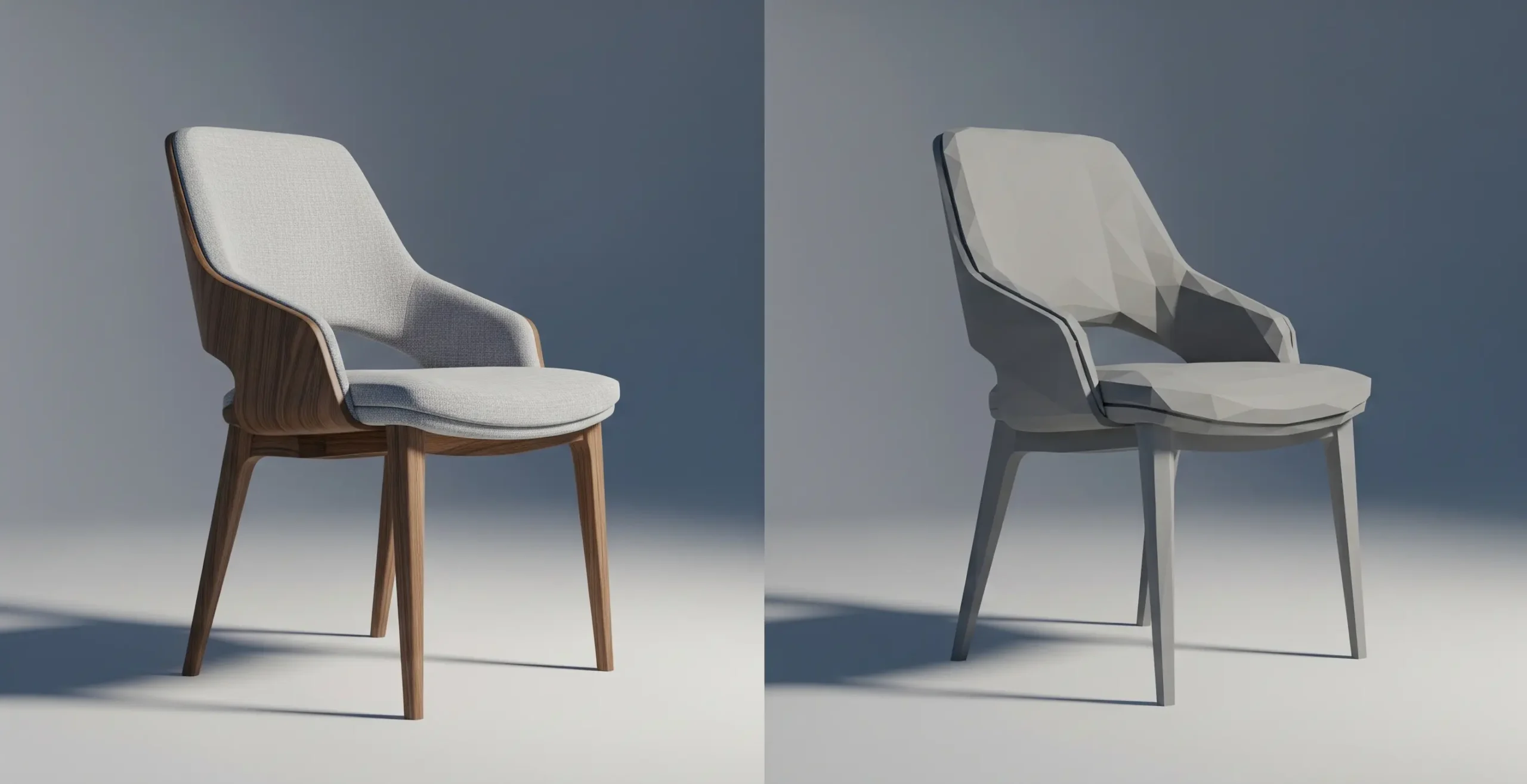
High Poly vs Low Poly: At a Glance
| Criteria | High Poly | Low Poly |
| Polygon Count | Extremely high | Relatively low |
| Render Time | Longer | Faster |
| Use Cases | Close-up shots, print, animation | Web, real-time, initial concepts |
| File Size | Large | Compact |
| Device Compatibility | Desktop rendering only | Mobile/AR/VR friendly |
When to Use High Poly Models in Furniture Visualization
High poly rendering does well in scenarios when realism and high-quality are essential.
1. Marketing & Catalog Visuals
Manufacturers need eye-catching product renders for print catalogs, website banners, and advertisements. In such cases, every grain of wood or stitch in the fabric must be visible—this is where a high poly model works best.
2. Close-up Shots & Zoom Views
High-poly models are perfect for close-up renders, which allow viewers to examine texturing, stitching, grain, and edge details up close.
3. High-End Client Approvals
When presenting final design concepts to high-ticket clients, using high poly rendering helps leave a lasting impression by showcasing materials and design precision at their best.
When to Use Low Poly Models in Furniture Visualization
Low poly models play a vital role during early design iterations or for delivering fast, responsive visual content.
1. Real-Time Web & Mobile Previews
Low poly 3D models offer smooth operation for mobile apps or web-based product configurators. They are device-friendly, load more quickly, and interact better.
2. AR/VR Integration
Lightweight assets are necessary for augmented and virtual reality. Low polygonal models ensure top performance on mobile devices and headsets.
For AR delivery, glTF 2.0 and USDZ are the standard export formats; FBX and OBJ remain common for desktop rendering pipelines.
3. Early Design Prototypes
During the initial visualization phase, designers can use low poly models to present layout concepts and spatial design without waiting for long render times.
Strategic Considerations: Choosing the Right Approach
Here are a few decision-making factors to consider:
Purpose of Visualization
- Presentation & Sales: Use high poly.
- Speed & Testing: Stick to low poly.
Target Platform
- Desktop-based rendering or print: High poly models are preferable.
- Web or mobile AR/VR: Use low poly.
Budget and Time Constraints
High poly modeling is more resource-intensive. When deadlines are tight or budgets limited, low poly meaning becomes clear—speed and efficiency win.
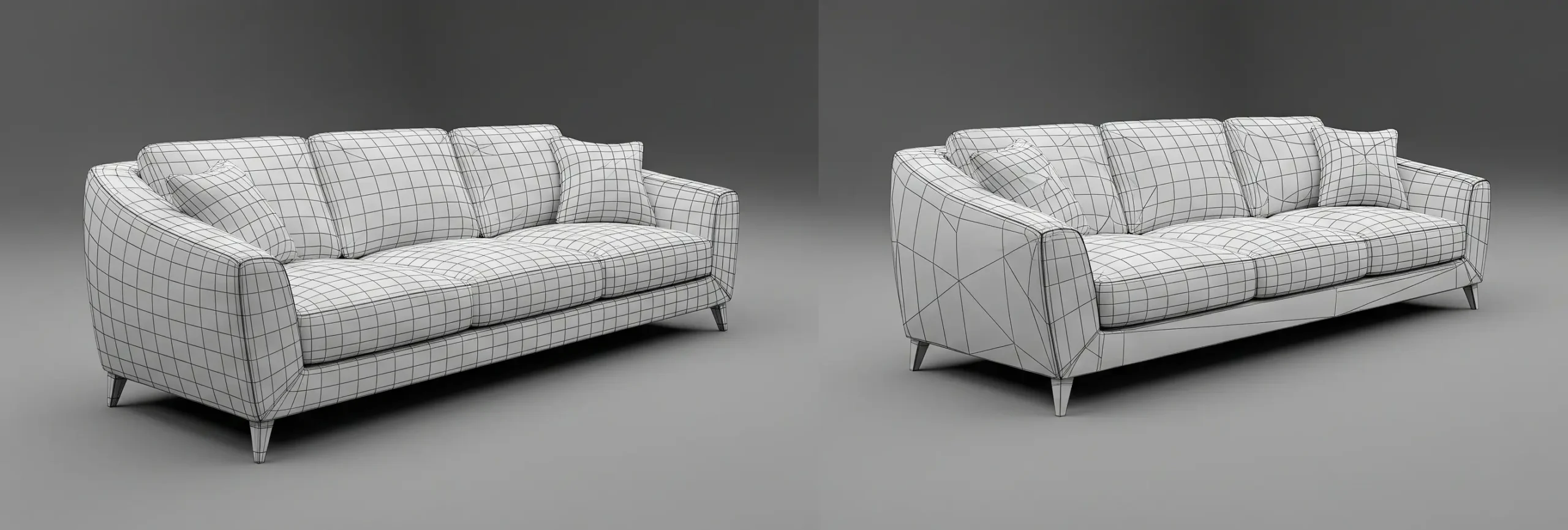
Hybrid Approach: Best of Both Worlds
Some professional workflows blend both models:
- Use low poly models during the ideation and approval phase.
- Switch to high poly models for final renders.
This saves time, reduces system load, and maintains visual quality where it matters.
This dual-asset strategy maps directly to what the industry calls a Level of Detail (LOD) workflow. LOD systems assign different polygon-count versions of the same model to different viewing distances or platform contexts — LOD0 for close-up high-fidelity renders, LOD1 and LOD2 for mid and distant views or interactive applications. Most professional 3D pipelines in furniture and product visualization manage at least two LOD tiers per asset.
Key Takeaways
| Situation | Recommended approach |
|---|---|
| Print catalog or hero render | High poly |
| Client design approval (early stage) | Low poly |
| Web-based product configurator | Low poly |
| AR/VR asset | Low poly (glTF/USDZ optimized) |
| Final marketing animation | High poly |
| Layout mockup or spatial planning | Low poly |
| Close-up material or stitch detail | High poly |
Conclusion
The high poly vs low poly question doesn’t have a single right answer — it has a right answer for each phase of your project. Studios that treat polygon count as a fixed spec rather than a workflow variable consistently waste time in the wrong direction: over-engineering assets for platforms that can’t render them, or under-building geometry that clients will scrutinize at close range.
The professional standard is a dual-track workflow: low poly through ideation and approval, high poly for final delivery. Getting that pipeline right — knowing when to switch, how to manage the asset handoff, and what fidelity each platform actually demands — is where visualization quality is won or lost.
If you’re not sure which approach your project needs, the answer is usually in the delivery spec. Start there.