How We Built a 3D Jersey Configurator for Shopify

Customizable products present a challenge that standard eCommerce photography does not fully solve. A conventional jersey can usually be presented effectively through a set of product images, close-up shots, and perhaps a video. However, once customers are able to change colors, logos, numbers, text, and other visual elements, a fixed collection of images can no longer represent the full range of possible outcomes.

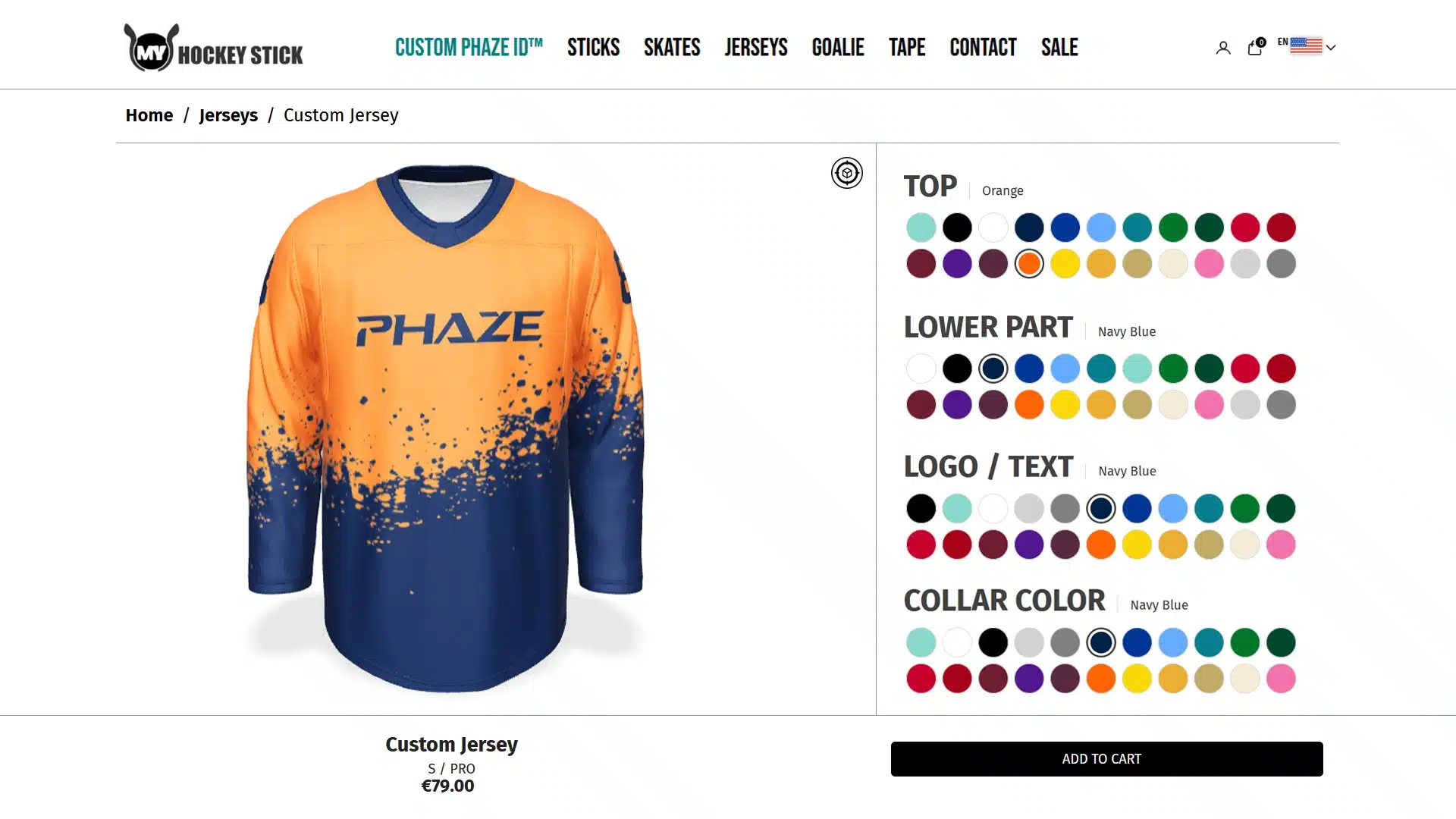
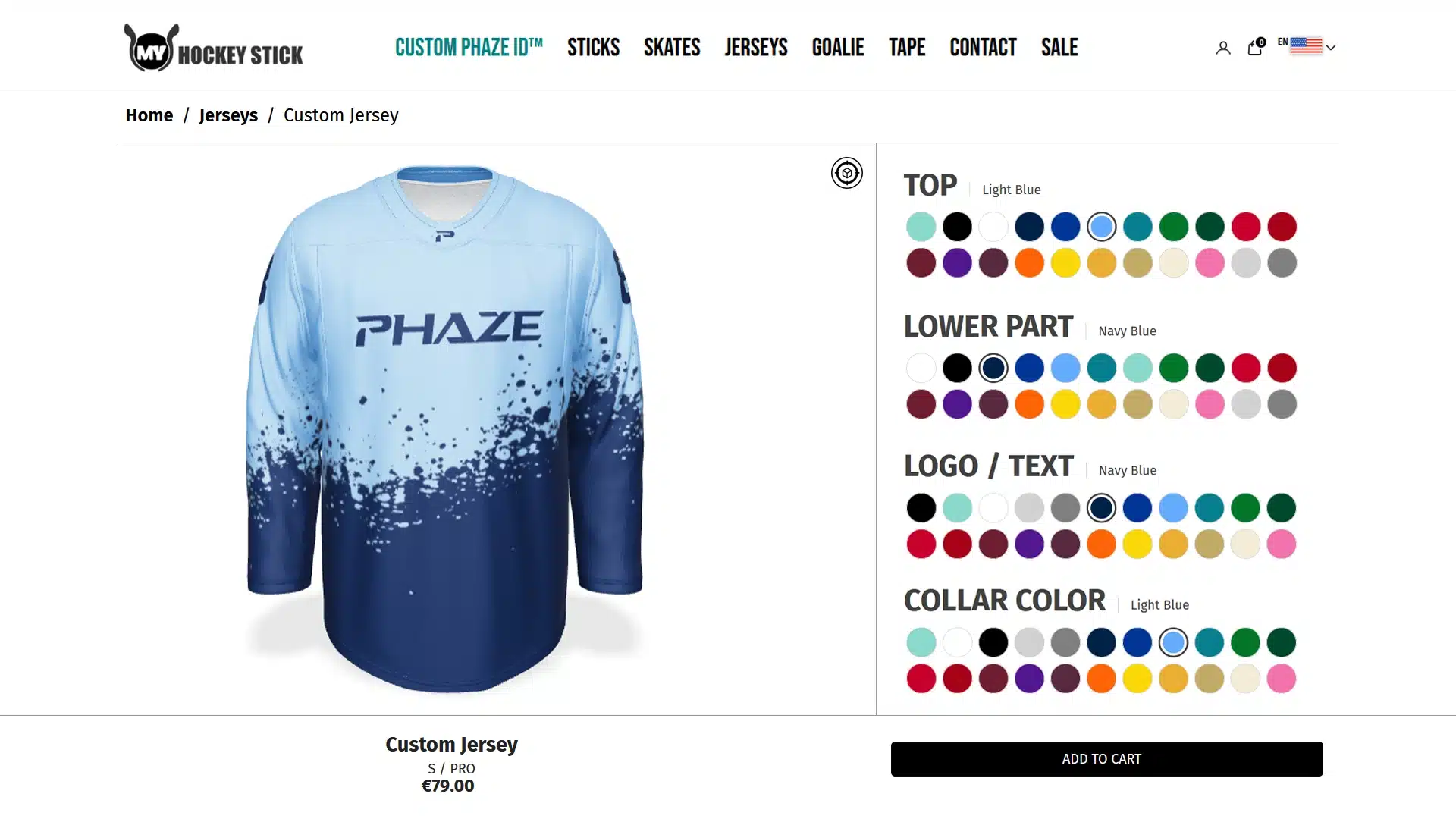
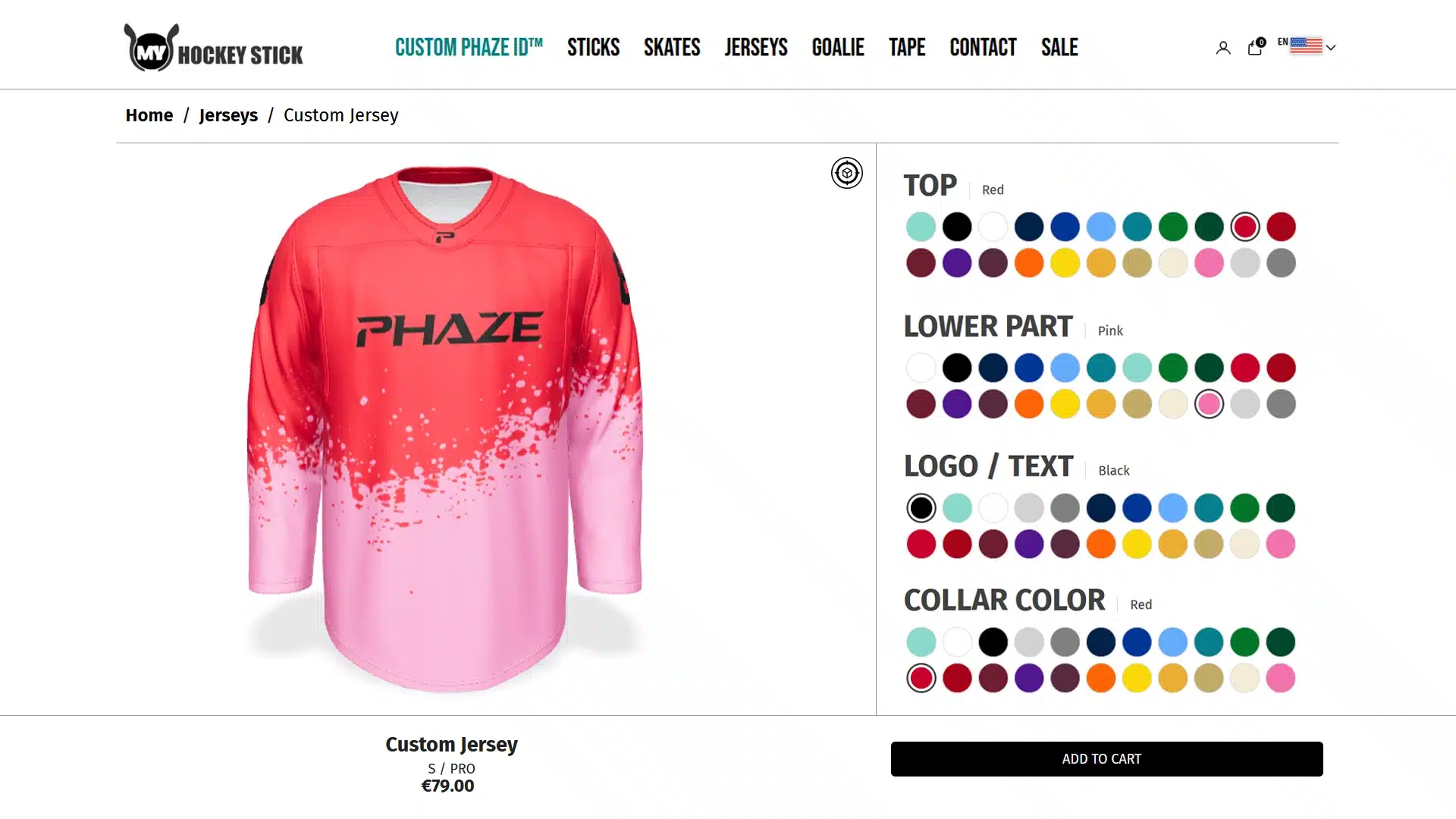
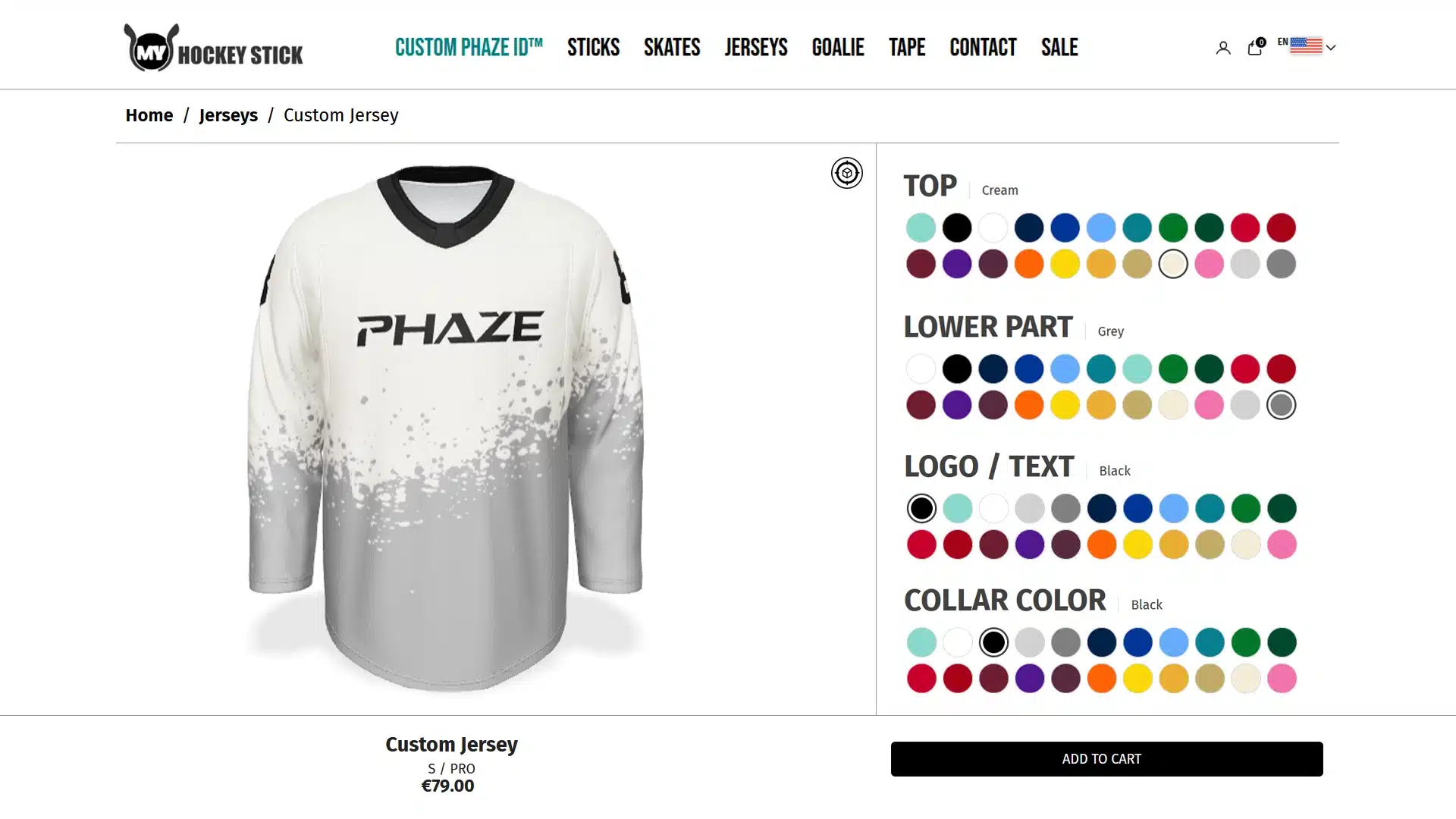
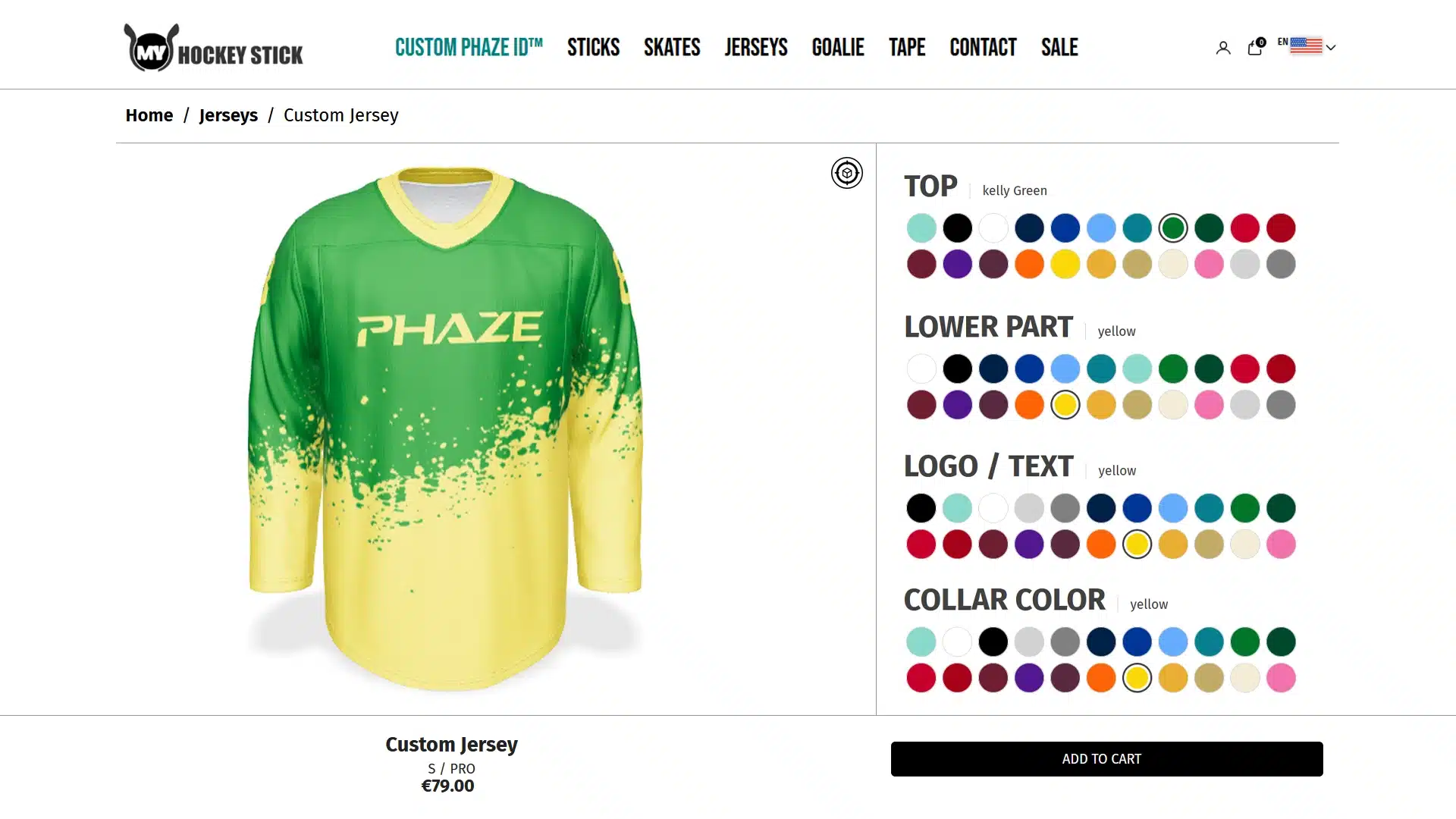
For this project, 4dviz Studio developed a real-time 3D Jersey Configurator for a Shopify eCommerce experience. Our scope covered both the optimized 3D jersey asset and the complete configurator logic, allowing customers to customize multiple parts of the product and preview those changes directly on the interactive 3D model. The experience was created using Angel 3D Configurator and designed to work across both desktop and mobile devices.

Project at a Glance

Project AreaImplementation
ProductCustom sports jersey
eCommerce PlatformShopify
Configurator PlatformAngel 3D Configurator
Main Color ZonesUpper jersey + lower jersey
Available Colors22 colors
Additional CustomizationLogos, numbers, and text
3D FormatGLB
Main Asset TargetBelow approximately 15 MB
Device SupportDesktop + mobile
4dviz Scope3D model preparation, optimization, textures, and full configurator logic
Commerce IntegrationProduct selections connected with Shopify workflow

This combination of 3D production and configuration logic meant the project went significantly beyond creating a standard product model. The asset needed to function as part of an interactive eCommerce system while remaining visually convincing and practical for browser-based delivery.

The Challenge: Presenting a Highly Customizable Jersey Online

The jersey was built around two main customizable color areas: an upper color zone and a lower color zone. Each of these regions could be changed using a palette of 22 available colors, allowing customers to create a wide range of visual combinations directly within the configurator.

The customization extended beyond the main jersey colors. Logos, numbers, and text positioned across the chest, sleeves, and back could also be changed using the same 22-color system. Once these different elements were combined, the product could exist in a very large number of possible visual variations.

Presenting every possible combination through traditional product photography or pre-rendered images would have been inefficient. Even if a large image library were created, customers would still need to mentally combine their selected options and imagine what the finished jersey might look like.

The actual business problem was therefore larger than simply creating a good-looking 3D jersey. The challenge was to give customers a practical way to build and preview their own version of the product directly inside the online shopping experience.

Without a live preview, customers would have to pick colors from a chart like this and imagine the finished jersey.

Combination 1 of 484

What the Configurator Needed to Achieve

Before building the configuration system, several functional requirements needed to work together:

  • Allow the upper and lower jersey colors to be controlled independently.
  • Provide 22 selectable colors across the configurable visual elements.
  • Support customizable logos, numbers, and text on different parts of the jersey.
  • Keep the 3D product responsive enough for browser-based interaction.
  • Maintain a consistent visual appearance while the user rotated the jersey.
  • Work effectively across both desktop and mobile devices.
  • Connect the selected product configuration to the Shopify purchasing workflow.

These requirements influenced both the way the 3D asset was prepared and the way the configurator logic was structured.

Our Solution: Turning a Static Product into an Interactive 3D Experience

We approached the project as an interactive product system rather than a traditional visualization assignment. The solution combined a web-optimized 3D jersey, structured customization controls, multiple texture variations, and the configuration logic required to connect those choices to the product experience.

Using Angel 3D Configurator, customers could interact with the jersey and immediately see how their selections affected the product. Instead of browsing through large numbers of predefined images, the customer could create the desired combination directly on the 3D model.

This shift from static visualization to interactive visualization was central to the project. A traditional render communicates one finished version of a product, while a configurator needs to support many possible outcomes and respond instantly to the customer’s selections.

Creating and Optimizing the Configurator-Ready 3D Jersey

A 3D asset intended for a product configurator has different requirements from one created only for offline rendering. In a traditional product visualization, the artist usually controls the camera, lighting, and final viewing angles. In an interactive experience, the customer can rotate the product and inspect it from perspectives that may never have been used in a conventional render.

For that reason, the jersey needed to remain visually consistent from multiple angles. We focused on preserving the important garment proportions, overall silhouette, graphics, visible construction details, and material appearance while preparing the model for real-time use.

Performance was equally important. A web-based configurator has to download the model and textures, render the product in real time, and respond while the customer rotates the jersey or changes customization options. Heavy geometry, oversized textures, or inefficient asset structures can directly affect the usability of that experience.

For this project, our production target was to keep the main GLB asset below approximately 15 MB. The goal was not simply to create the smallest possible file, but to find an effective balance between visual fidelity, loading performance, and real-time responsiveness across different devices.
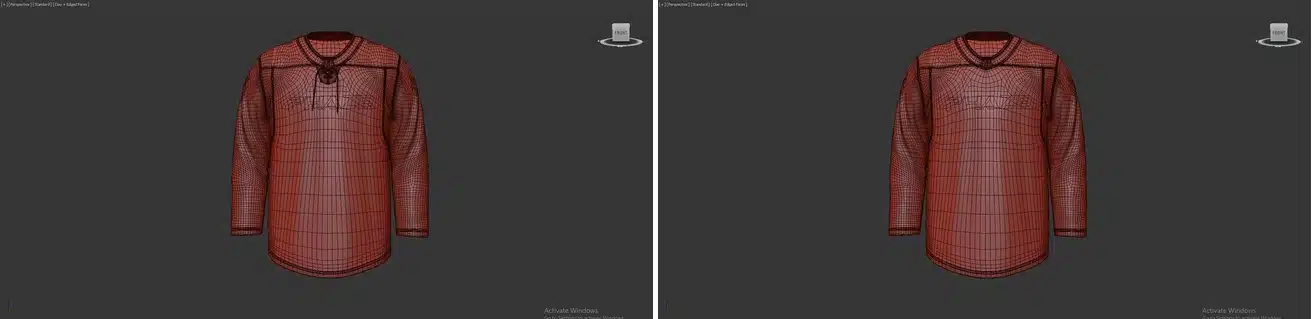
jersey 3d modeling with both collar variants

Building the 22-Color Customization Logic

One of the most important parts of the project was building the configuration logic behind the product. The jersey contained two primary color regions—the upper section and the lower section—and each could be assigned one of 22 available colors.

The visual customization system also included the logos, numbers, and text used across the jersey. These graphic elements could be updated through the available color palette, allowing customers to coordinate or contrast different parts of the design according to their preferences.

To make this work, the configurable elements had to be prepared and organized so that the system understood exactly which texture or visual variation belonged to each product option. Different texture variations were uploaded and connected to the corresponding controls inside the configurator.

This stage required considerably more than exporting a GLB file. Our scope included 3D model preparation, optimization, texture organization, and full configurator logic setup, ensuring that each option affected the correct part of the jersey without interfering with unrelated elements.
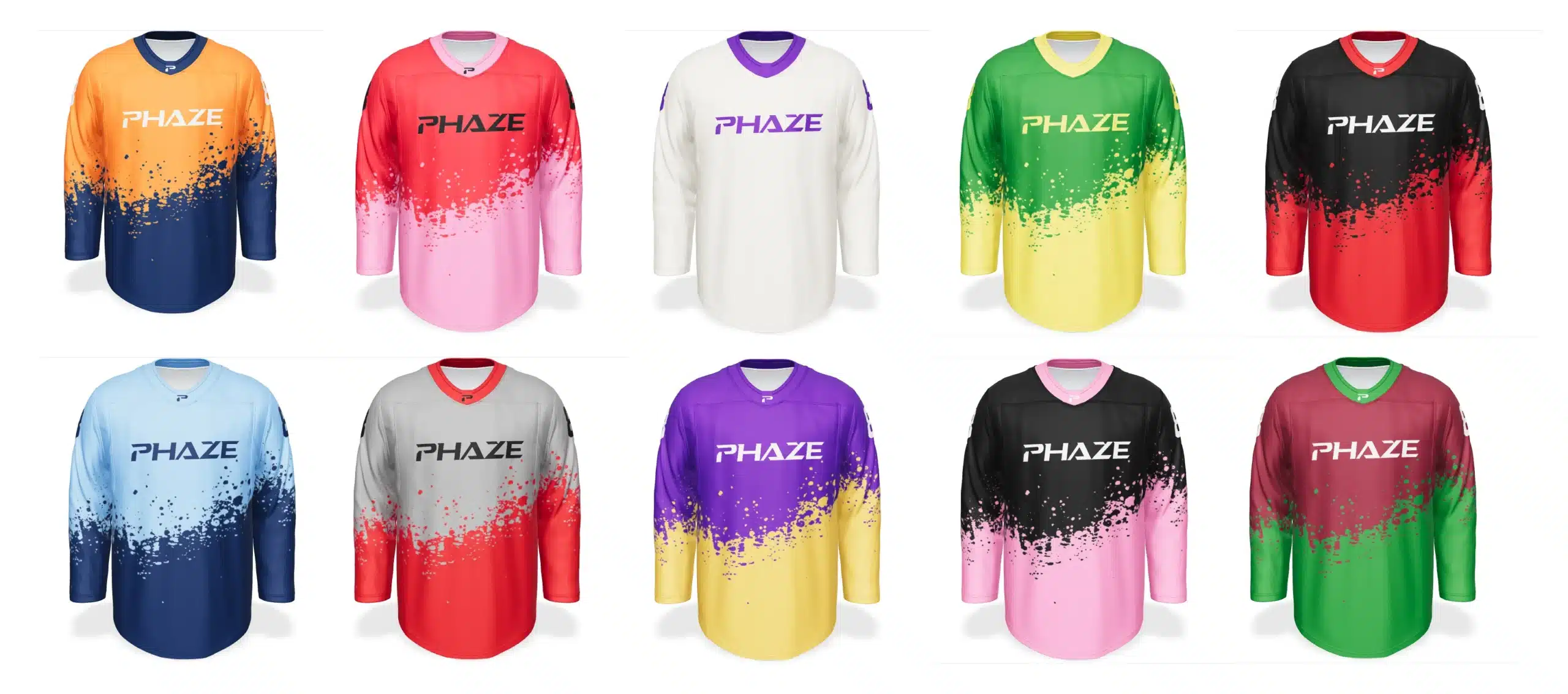
multiple jersey combinations

Texture-Based Variation Setup

The configuration system relied on structured texture variations to represent different visual choices. Each customizable region needed to respond correctly when a customer selected a new option, so the relationship between textures, materials, and product controls had to be planned carefully.

For example, changing the upper jersey color needed to affect only the intended upper region while leaving the lower section and other visual components unchanged. In the same way, graphic elements such as numbers, logos, and text needed to respond independently according to the configuration rules.

This separation was important because a real-time configurator is only useful when the customer’s selections behave predictably. If one option unintentionally changes another part of the product, the experience quickly becomes confusing.

By structuring the assets and variation logic correctly, the final configurator was able to provide a clearer and more intuitive customization workflow.
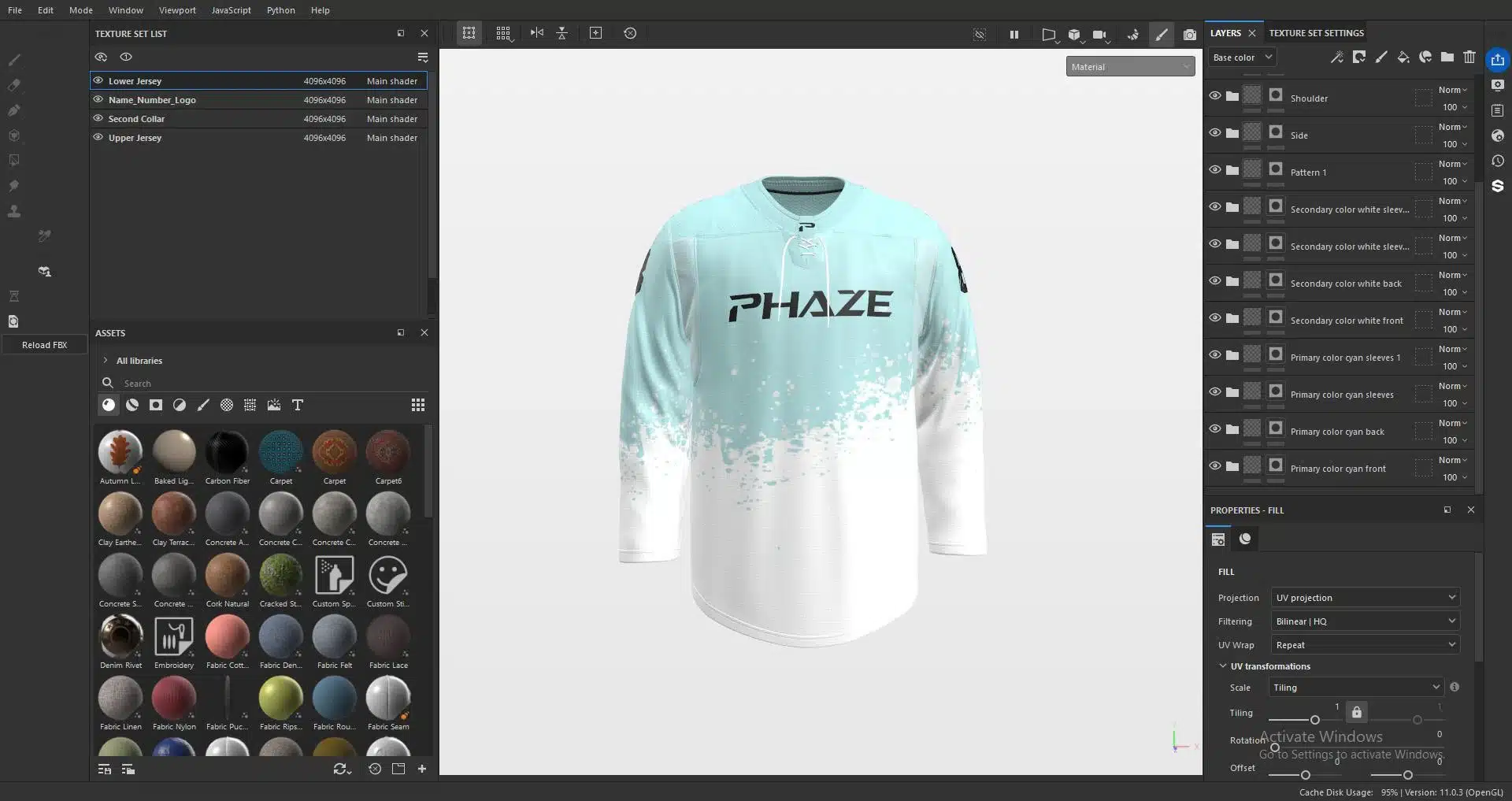
jersey texture-based variation setup

Angel 3D Configurator and Shopify Integration

The interactive configuration layer for the project was implemented using Angel 3D Configurator. The platform provided the environment through which the optimized jersey asset, textures, and customization logic could become part of a working product experience.

The configurator was then connected to the client’s Shopify workflow so that the interactive jersey was not simply a standalone 3D demo. It became part of the actual eCommerce journey where customers could explore the product, configure its appearance, and continue toward the purchasing process.

In this particular implementation, pricing remained mostly consistent across the available color and size selections. Dynamic price calculation was therefore not one of the major technical challenges. The more important requirement was ensuring that the selected customization options were represented correctly and remained connected to the Shopify product flow.

The result was a product experience where interactive 3D supported the shopping process rather than existing separately from it.
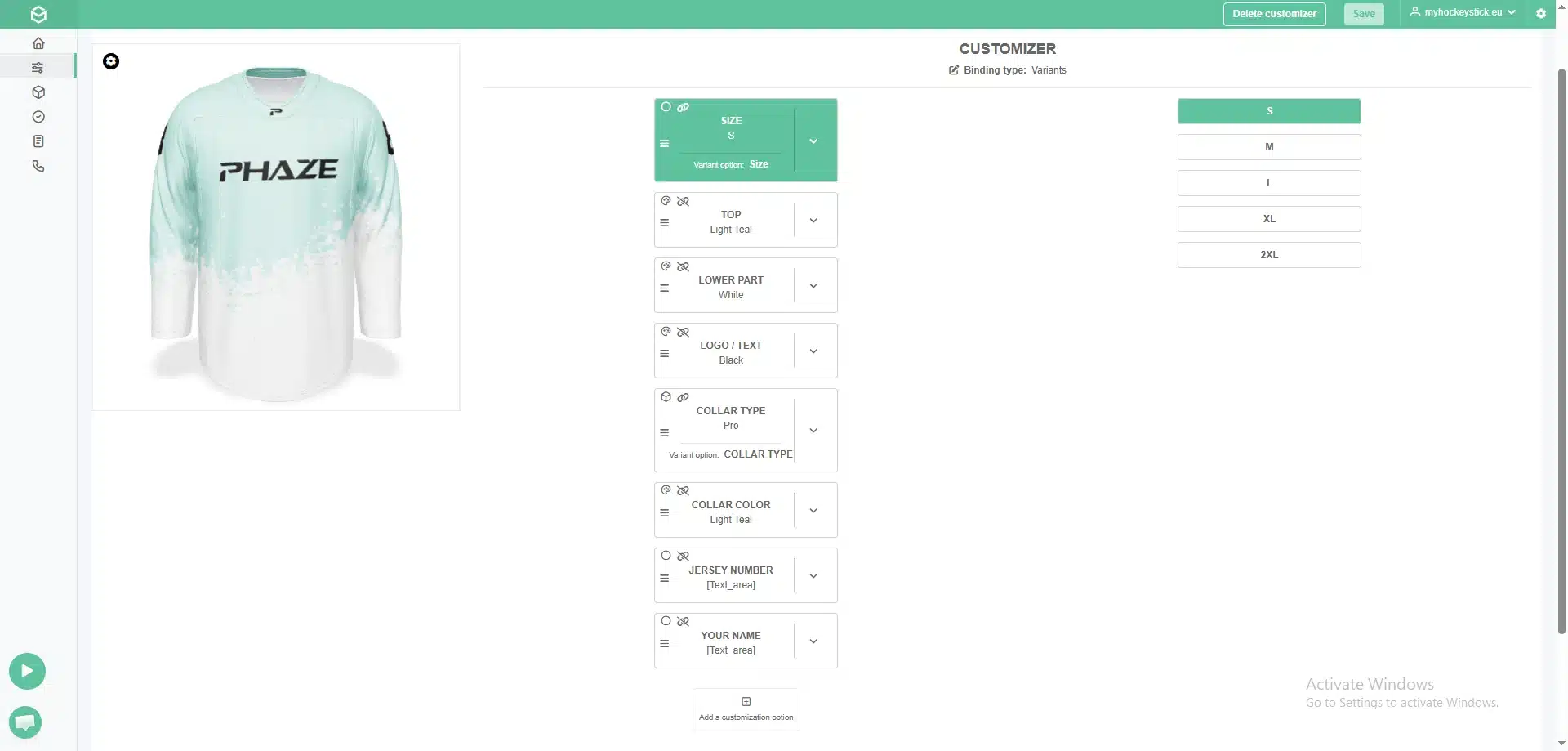
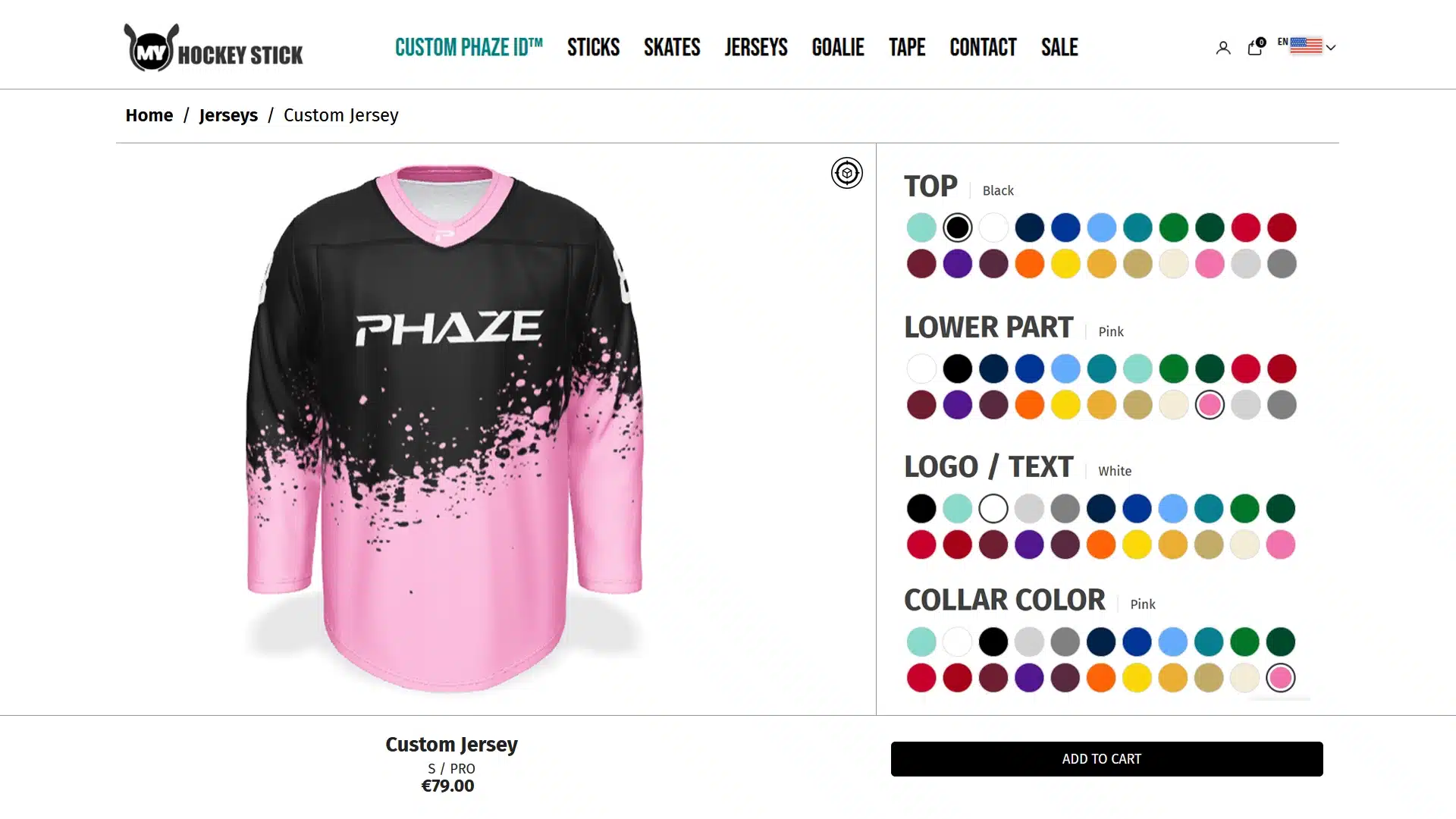
angle 3d configuration and shopify integration

Designing the Experience for Desktop and Mobile

The configurator was designed to work across both desktop and mobile devices. This was an important requirement because an eCommerce experience cannot assume that customers will always browse from a desktop computer.

Desktop users benefit from a larger viewport, more visible controls, and more screen space for interacting with the product. Mobile users need the same core functionality to remain usable within a much smaller interface while still maintaining acceptable loading and interaction performance.

This made optimization especially important. A model that performs smoothly on a powerful desktop may feel noticeably heavier when loaded through a mobile browser, so the asset-production workflow had to consider the complete customer experience rather than only the appearance of the 3D model.

The final approach balanced the visual presentation of the jersey with the practical requirements of real-time interaction across different device types.

Why Interactive 3D Works Well for Custom Sportswear

Sportswear is particularly well suited to product configuration because visual customization is often a core part of the buying decision. Teams, clubs, schools, organizations, brands, and individual customers frequently need different combinations of colors, logos, numbers, names, and design details.

In a traditional workflow, communicating all of those possibilities can require a large number of product images or manually generated previews. As the number of customizable elements increases, that approach becomes increasingly difficult to manage.

A real-time 3D configurator changes that relationship. Instead of creating a separate visual for every possible combination, a structured 3D product can represent many variations dynamically. Customers can experiment with those options directly and understand the visual result before making a purchasing decision.

For products with meaningful customization, this creates a more scalable and more intuitive way of presenting product choices online.

The Result: A More Engaging Product Experience

The completed project delivered a Shopify-ready 3D jersey configurator with real-time visual customization across multiple product elements. Customers were able to change the two primary jersey color regions through a 22-color palette and apply color variations to logos, numbers, and text while seeing those changes directly on the product.

The experience worked across desktop and mobile devices and remained connected to the Shopify product workflow. From a qualitative perspective, the interactive configurator produced noticeably stronger customer engagement with the product experience, and the client was very satisfied with the completed solution.

We are intentionally not publishing a specific conversion-rate or sales uplift because verified analytics data is not currently available for public disclosure. Rather than assigning unsupported numerical claims to the project, we prefer to distinguish clearly between measured performance and observed outcomes.

What we can say with confidence is that the configurator gave customers a more interactive way to understand a highly customizable product and reduced their dependence on static product imagery alone.

What We Learned from the Project

One of the strongest lessons from this project was that a successful configurator starts with the asset architecture, not with the user interface. Geometry, textures, material structure, customizable regions, naming, optimization, and configuration logic all need to support one another.

Trying to take a heavy rendering asset and retrofit it into a real-time experience can create unnecessary technical problems. Planning the product for interactive use from the beginning makes it easier to maintain visual quality while controlling performance.

The project also reinforced the importance of separating customizable elements logically. A configurator may appear simple from the customer’s perspective, but behind that interface there needs to be a clear relationship between product options, textures, materials, and the 3D asset.

This planning creates another advantage: future expansion becomes easier. If the brand later wants to introduce additional colors, graphics, product variants, or related jersey designs, a well-structured configuration system provides a stronger foundation for extending the experience.

When Does a 3D Product Configurator Make Sense?

Not every eCommerce product requires an interactive configurator. For a simple fixed product with only a few minor variations, professional photography or high-quality 3D product rendering may already provide everything the customer needs.

The business case becomes much stronger when customers need to make several meaningful visual choices before purchasing. Custom apparel, furniture, finishes, materials, footwear, accessories, equipment, and other products with multiple configurable elements are particularly strong candidates.

In these situations, interactive 3D can solve a genuine communication problem. Instead of asking customers to imagine how separate choices will combine, the product itself becomes the preview.

That is where a 3D configurator becomes more than a visual feature. It becomes part of the product-selection and purchasing experience.

Reusing 3D Assets Beyond the Configurator

Another advantage of creating the product correctly is that the underlying 3D asset can potentially support more than one digital channel. Depending on the production requirements, the same master asset can contribute to product rendering, marketing visuals, animation, interactive web experiences, AR previews, and future configurator applications.

For eCommerce brands building a larger digital content pipeline, this means a well-prepared 3D asset can become reusable product infrastructure rather than a one-time marketing deliverable. That broader reuse can be particularly valuable for companies managing large catalogs or planning to expand into interactive commerce over time.

Need a Custom 3D Product Configurator?

If you are planning a 3D product configurator for Shopify or another eCommerce platform, contact 4dviz Studio to discuss the product, customization requirements, and the 3D workflow needed to bring it online.

Frequently Asked Questions

What information do you need to start a 3D product configurator project?

The ideal starting package depends on the product, but useful materials generally include product dimensions, CAD or existing 3D files where available, reference photography, artwork or graphics, material references, and a clear list of the options customers need to customize. For configurable products, it is particularly important to define the variation logic early—for example, which colors, materials, components, or graphics can change independently.

Not necessarily. A configurator can be developed from an existing production-ready 3D asset, or the asset can be created specifically for the configurator. When starting from scratch, there is an advantage in designing the model, UVs, materials, and customizable regions around real-time requirements from the beginning rather than adapting an asset built exclusively for offline rendering.

Often, yes. If several products share similar customization rules, parts of the asset structure and configuration logic may be reusable. New products will still require their own optimized 3D assets and appropriate textures or materials, but a well-planned system can make expanding a product family considerably more efficient than rebuilding the experience from zero each time.

Potentially, yes. A well-prepared real-time 3D asset can often be adapted for other experiences such as web-based AR or mobile AR, although the final asset may require additional optimization, material adjustments, or platform-specific preparation. Planning for these possible future uses early can make the overall 3D asset pipeline more reusable.

There is no single timeline because the workload depends heavily on product complexity, the number of configurable elements, the condition of the source assets, texture and material requirements, eCommerce integration, and testing. A product with a few simple color options is fundamentally different from a system containing many components, graphics, materials, conditional options, and pricing rules. The most reliable approach is to review the product and customization logic before defining the production schedule.